
Lovart Introduces "Edit Elements" Feature, Enabling Layered Editing of Flat Images

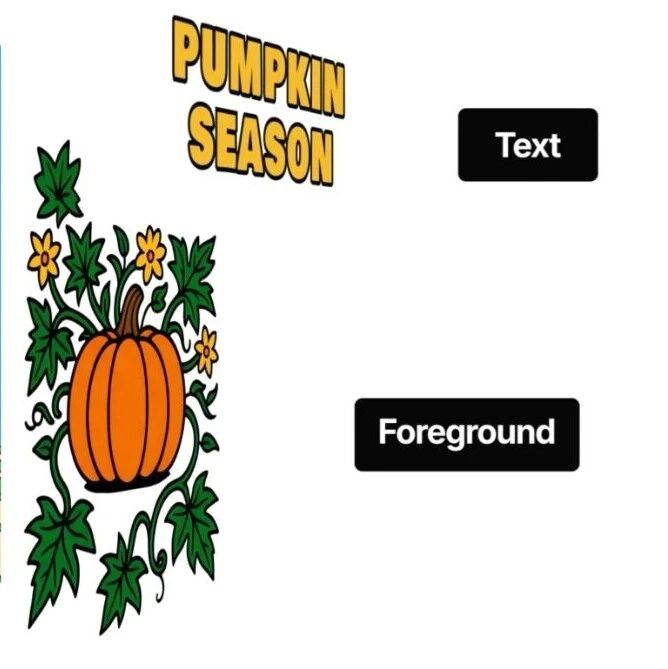
Lovart has launched its "Edit Elements" feature, allowing users to automatically separate and edit individual components within any image, including those generated by AI or existing "flat" designs. This development addresses a common challenge in digital design where images, once finalized, are difficult to modify without their original source files.
Key Highlights
Automatic Layer Separation: The feature identifies and separates elements like foreground, background, and text into editable layers.
Direct In-Platform Editing: Users can manipulate layers by dragging, rotating, scaling, replacing elements, and modifying text directly within the Lovart canvas.
Enhanced Reusability: Any image can be transformed into an editable template, facilitating secondary creation and batch adjustments.
Workflow Streamlining: It integrates with existing generation tools, offering a closed-loop process from concept to delivery.
Background / Context
The Adobe Firefly team previously demonstrated a similar "Layered Image Editing" concept on October 29th, showcasing the potential for AI to deconstruct images into editable layers. This concept highlighted a significant need in the design workflow, as AI-generated images and many finished designs are typically "flat" and lack individual editable components. Lovart's rapid introduction of its "Edit Elements" feature less than half a month later brings this capability to users, addressing the practical difficulty of modifying images without access to source files.
Technical / Strategic Details
Lovart's "Edit Elements" feature functions by employing AI to analyze an image and automatically recognize distinct elements such as text, backgrounds, and subjects. These identified elements are then converted into operable layers. This process allows for granular control over each component, enabling users to:
Modify Text: Change fonts, sizes, colors, and positions of text elements.
Adjust Visuals: Drag, rotate, scale, and replace image components.
Local Redrawing: Perform targeted modifications within specific layers.
The system is designed to "explode" an image into its constituent parts with a single click, transforming a static image into a dynamic, editable template. This capability extends to both AI-generated content and uploaded images, effectively turning any visual asset into a reusable and customizable resource.
Industry Relevance
This feature is significant for the broader AI and design landscape as it bridges the gap between image generation and post-production editing. Historically, AI-generated visuals, while fast to produce, often lacked the flexibility for detailed modification without extensive manual work or re-generation. By enabling layered editing, Lovart moves AI creation beyond mere generation into a phase of enhanced control and iterative design. This could impact various sectors, including:
Marketing and E-commerce: Brands and content teams can rapidly adapt promotional materials for different campaigns or seasons without relying on original design files or professional software.
Individual Creators: Artists and designers can reuse and modify elements from their work more efficiently, fostering greater creative flexibility.
Workflow Efficiency: The ability to edit directly within the platform reduces the need to switch between multiple software applications, streamlining design processes.
Outlook
The "Edit Elements" feature represents an ongoing development in AI's integration into creative workflows, with potential for further refinement in accuracy and compatibility with professional design software formats.
Stay Ahead of the AI Curve
Join 50,000+ subscribers getting the latest AI tools, trends, and tutorials delivered to their inbox weekly.
No spam, unsubscribe at any time.