AxonHub Platform Unifies AI Development with API Gateway and Management Tools

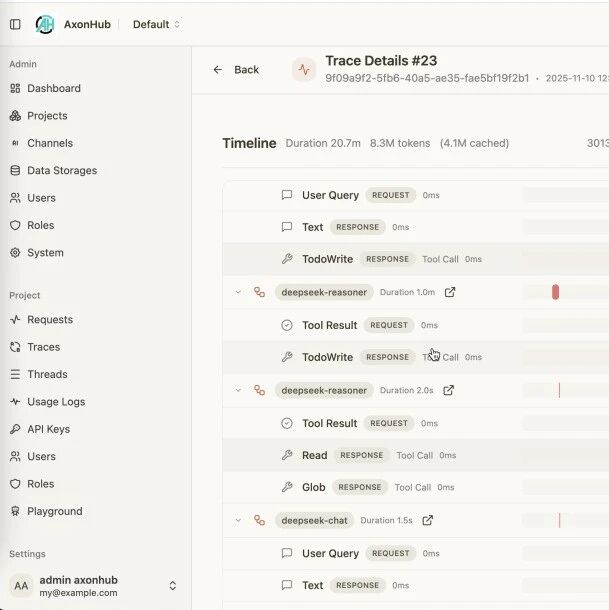
[BODY] AxonHub, an all-in-one AI development platform, offers a unified API gateway, project management features, and a suite of development tools. The platform integrates an API layer compatible with OpenAI, Anthropic, and various AI SDKs, utilizing a converter pipeline architecture to route requests to different AI providers. It includes full tracing capabilities, a project-based organizational structure, and an integrated Playground for rapid prototyping, designed to streamline AI development workflows for developers and enterprises.
Core Features and Capabilities
The platform provides a unified API that supports OpenAI and Anthropic interfaces, enabling model interchange and mapping through a conversion pipeline without requiring code modifications. Its tracing and threads feature records the complete call chain in real-time, enhancing observability and troubleshooting efficiency. Fine-grained permission control, based on Role-Based Access Control (RBAC), allows teams to manage access, quotas, and data isolation. Additionally, adaptive load balancing intelligently selects optimal AI channels to ensure high availability and performance.
AxonHub's multi-provider AI gateway offers a unified API interface compatible with OpenAI standards, aiming to reduce vendor lock-in and migration risks. It incorporates automatic failover with multi-channel retry and load balancing, targeting service interruption times under 100 milliseconds. The platform also supports native Server-Sent Events (SSE) for streaming processing, designed to improve real-time user experience.
The platform supports thread-level tracing for each request without requiring modifications to existing OpenAI-compatible clients. Users can pass an AH-Trace-Id request header to link multiple requests to the same trace. Without this header, AxonHub records individual calls but cannot automatically associate related requests. This feature captures model metadata, request/response snippets, and time consumption data for problem identification.
Regarding API format support, AxonHub is fully compatible with OpenAI Chat Completions for text and image modalities, and fully supports the Anthropic API and Gemini for text and image. Partial support is available for OpenAI Responses and AI SDKs.
For security, AxonHub implements fine-grained permission control through RBAC and offers configurable data storage policies for data localization. API key management is handled via JWT and scope control.
Deployment and Configuration
AxonHub can be deployed on personal computers for individual developers and small teams, or on servers for production environments requiring high availability.
For personal computer deployment, users can download the latest version from GitHub Releases, unzip the file, and run the executable. The system uses an SQLite database by default. Installation and service management scripts are provided for starting and stopping the AxonHub service. The application is accessible via http://localhost:8090.
Server deployment supports multiple databases, including SQLite, TiDB Cloud (Starter and Dedicated), TiDB V8.0+, Neon DB, PostgreSQL 15+, and MySQL 8.0+. These options cater to various deployment scales and environments, from development to large-scale distributed systems.
AxonHub uses YAML configuration files, with support for environment variable overrides. Key configuration parameters include server port, name, debug status, database dialect, DSN, log level, and encoding.
Docker Compose deployment is also supported, allowing users to clone the project, set environment variables for database configuration, and start the service using docker-compose up -d. Virtual machine deployment involves similar steps, including cloning the project, setting environment variables, and using provided scripts for installation and service management.
Usage Guide
Initial setup involves accessing the administration interface, configuring AI providers by adding API keys and testing connections, and creating users and roles for permission management.
Channel configuration allows users to define AI provider channels within the administration interface, specifying parameters such as name, type, base URL, credentials, and supported models. The platform includes features to test connections and enable channels.
Model mapping enables the system to rewrite model names on the gateway side when a requested model name does not match the upstream provider's supported name. This feature can map custom aliases to upstream models and set fallback logic for multi-channel scenarios.
Request parameter override allows forcing default parameters for a channel, regardless of the upstream request. Users can provide a JSON object during configuration, which the system merges before forwarding the request. This supports top-level fields (e.g., temperature, max_tokens) and nested fields using dot notation.
Users can create accounts, assign roles and permissions, and generate API keys within the platform. Integration guides are available for specific tools like Claude Code and Claude Codex, providing examples for environment variables, configuration templates, and workflow examples.
The platform offers SDKs for Python and Node.js, allowing developers to interact with AxonHub using familiar client libraries by setting the api_key and base_url to the AxonHub instance.